
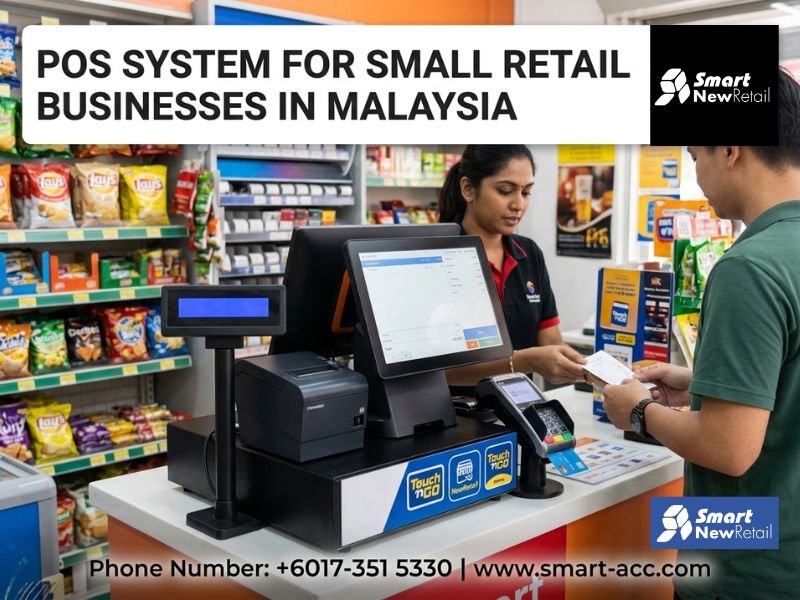
A point of sale system for small retail businesses in Malaysia combines a payment terminal, inventory tracker, and sales recorder into one tool. First-time shop owners should start by identifying their transaction volume, stock size, and budget before choosing a system. Entry-level cloud-based options typically cost between RM 50 to RM 200 per month and work on standard tablets or laptops.
Opening a retail shop in Malaysia is exciting — and overwhelming. Between sourcing stock, hiring staff, and setting up your space, the question of how to handle payments and inventory often gets pushed to the last minute. It shouldn't. Your point of sale Malaysia setup affects everything from how fast your checkout line moves to whether your year-end accounts actually balance. This guide walks you through each decision in the order you'll actually face it — no jargon, no fluff.
What Is a POS System and Why Does a Small Shop Need One?
A POS system is the combination of hardware and software that processes your sales. At its most basic, it replaces a manual cashbook. At its best, it tracks every item sold, alerts you when stock runs low, generates daily sales reports, and even integrates with your accounting software.
For a small retailer in Malaysia, the practical benefits show up fast:
Fewer human errors at checkout
Real-time inventory visibility
Sales reports you can read in under five minutes
Compliance with SST (Sales and Service Tax) reporting requirements
According to SME Corp Malaysia, there are over 1.2 million SMEs in Malaysia, with retail being one of the dominant sectors. Most that struggle with growth cite poor inventory control and financial visibility as root causes — both problems a proper POS system directly solves.
Step 1 — Understand What Your Shop Actually Needs
Before you look at any software, answer these three questions honestly:
How many products will you carry? A shop with 50 SKUs has very different needs from one with 500.
Will you have one or multiple cashiers? Multi-user access and permission settings matter if more than one person handles the till.
Do you sell online too? If yes, you'll want a system that syncs inventory between your physical store and platforms like Shopee or Lazada.
These answers determine whether you need a basic single-terminal setup or something with multi-location and e-commerce sync capabilities. Don't pay for features you won't use in the first year.
Step 2 — Choose Between Cloud-Based and On-Premise Systems
Cloud-Based POS
This runs through the internet and stores your data on remote servers. You access it via a browser or app. It's the go-to choice for most retail startups because it's low-cost to start, easy to update, and accessible from your phone if you're not on-site.
On-Premise POS
This is installed locally on your hardware. It works without internet but requires a larger upfront investment and manual updates. It suits businesses in areas with unstable connectivity or those handling sensitive data internally.
For first-time shop owners in Malaysia, cloud-based is almost always the better starting point. An affordable POS Malaysia solution on a monthly subscription keeps your initial capital low and lets you scale features as your business grows.
Step 3 — Know What Hardware You Actually Need
You don't need to buy expensive dedicated hardware to get started. Here's a realistic breakdown:
Hardware
Purpose
Estimated Cost (RM)
Tablet or laptop
Runs the POS software
RM 800 – RM 2,000
Barcode scanner
Speeds up checkout
RM 80 – RM 300
Receipt printer
Prints physical receipts
RM 200 – RM 500
Cash drawer
Stores physical cash securely
RM 150 – RM 400
Card/e-wallet terminal
Accepts DuitNow, Visa, Mastercard
RM 0 – RM 500 (varies by bank)
Many Malaysian banks and payment providers — including Maybank, CIMB, and GrabPay — offer subsidised terminals or zero-cost devices when you sign up for their merchant services. Always check these deals before purchasing hardware outright.
Step 4 — Look for These Core Features in an SME POS System
Not all systems are equal. When evaluating an SME POS system, focus on these non-negotiable features:
Inventory management — Add products, set reorder alerts, and track stock movement automatically
Sales reporting — Daily, weekly, and monthly breakdowns by product or category
SST compliance — The system should handle tax calculations and generate compliant receipts
Multi-payment support — Cash, card, QR pay, and e-wallets like Touch 'n Go eWallet and DuitNow QR
Customer management — Store customer details, track purchase history, and run simple loyalty programmes
Accounting integration — Sync with tools like SQL Account or AutoCount to avoid double-entry bookkeeping
If a system is missing two or more of these, look elsewhere — especially if you're planning to grow past a single outlet.
Step 5 — Evaluate Pricing Honestly
Retail POS for startups in Malaysia typically follows one of three pricing models:
Monthly subscription — RM 50 to RM 250/month depending on features and number of users
One-time licence — RM 1,500 to RM 5,000+ upfront with annual support fees
Free tier with paid upgrades — Suitable only for very small operations with limited SKUs
The cheapest option is rarely the best. Factor in support quality, software updates, and whether the vendor has a local presence in Malaysia. A provider who answers your call in Bahasa Malaysia or English during business hours is worth more than RM 30 savings a month.
Step 6 — Set Up and Train Your Team Properly
A POS system only works if your team uses it correctly. Most modern systems are designed for non-technical users, but a proper onboarding session still matters. Ask your provider for:
A guided setup session (ideally in-person or via video call)
Training videos in Bahasa Malaysia or English
A test mode to practise transactions before going live
Local customer support — not just a chat bot
Give your staff at least two days of hands-on practice before your soft launch. Errors during real transactions are more costly than a slow setup week.
Common Mistakes First-Time Retail Owners Make
Learning from others' missteps saves you time and money. Here are the most common errors new shop owners make when setting up their POS:
Buying hardware before confirming software compatibility
Choosing a system with no local support or Malaysian tax settings
Skipping inventory setup and just tracking sales — this breaks your reorder workflow immediately
Not backing up data or choosing a cloud system with no offline mode
Ignoring e-wallet and QR payment integration — over 50% of Malaysian retail transactions now involve some form of digital payment, according to Bank Negara Malaysia's Payment Statistics report
Avoiding these five mistakes puts you ahead of most first-year retailers in Malaysia before you even open your doors.
The Right Time to Upgrade Your System
Start simple. You don't need enterprise features on day one. But watch for these signals that it's time to upgrade:
You're managing more than 300 SKUs and manual reorders are slipping through the cracks
You're opening a second outlet or adding an online store
Monthly sales reports take more than 30 minutes to compile
Your accountant is complaining about reconciliation errors
When those signals appear, your current system has served its purpose. It's time to move to something more robust — and providers like Smart Accounting offer scalable solutions built specifically for Malaysian SMEs navigating exactly this kind of growth transition.
FAQ: POS Systems for Small Retail Businesses in Malaysia
What is the best point of sale system for a small retail shop in Malaysia?
The best point of sale system in Malaysia for small retail shops depends on your budget, product range, and whether you sell online. Look for cloud-based systems with SST compliance, multi-payment support, and local customer service. Subscription-based options starting from RM 50/month are typically the most practical entry point for first-time shop owners.
How much does an affordable POS system cost in Malaysia?
An affordable POS system in Malaysia typically costs between RM 50 to RM 250 per month for a cloud-based subscription, or RM 1,500 to RM 5,000 for a one-time licence. Hardware such as a barcode scanner, receipt printer, and cash drawer adds roughly RM 500 to RM 1,500 as a one-time setup cost.
Do I need a POS system if I only have one cashier?
Yes. Even with one cashier, a POS system automates inventory tracking, generates sales reports, and ensures accurate SST calculations. Manual cashbooks are prone to human error and make end-of-day reconciliation time-consuming. A basic SME POS system pays for itself quickly in time saved and errors avoided.
Is a POS system mandatory for small businesses in Malaysia?
A POS system is not legally mandatory, but it is strongly recommended for SST-registered businesses. The Malaysian Inland Revenue Board (LHDN) and Royal Malaysian Customs Department expect accurate sales records. A POS system makes compliance straightforward and reduces audit risk significantly for retail businesses with regular transaction volumes.
Can a POS system in Malaysia accept DuitNow QR and e-wallet payments?
Yes. Most modern POS systems in Malaysia support DuitNow QR, Touch 'n Go eWallet, GrabPay, and major card networks. This is essential since digital payments account for a growing share of Malaysian retail transactions. Confirm e-wallet compatibility with your provider before purchasing, as some entry-level systems limit payment gateway integrations.
What is the difference between a cloud POS and a traditional POS system?
A cloud POS stores data online and is accessible from any device with internet access, making it flexible and easy to update remotely. A traditional on-premise POS stores data locally and works without internet but requires higher upfront costs and manual maintenance. Most Malaysian retail startups benefit more from a cloud-based setup due to lower initial investment.